
Log (Archive) Definitions
A log definition determines under which condition and with which calculation the value of a tag is saved to the archive. Log definitions are made in two places:
- on the Tag Management page, in the Log Definitions tab of the Other Definitions section at the bottom when a tag is selected,
- on the Settings > Log Definitions page in the left menu.
Log Definition Table
When a device is selected on the left of the tag management page, the tag table opens on the right. When a tag is selected in the table, the first tab of the Other Definitions section at the bottom is Log Definitions.
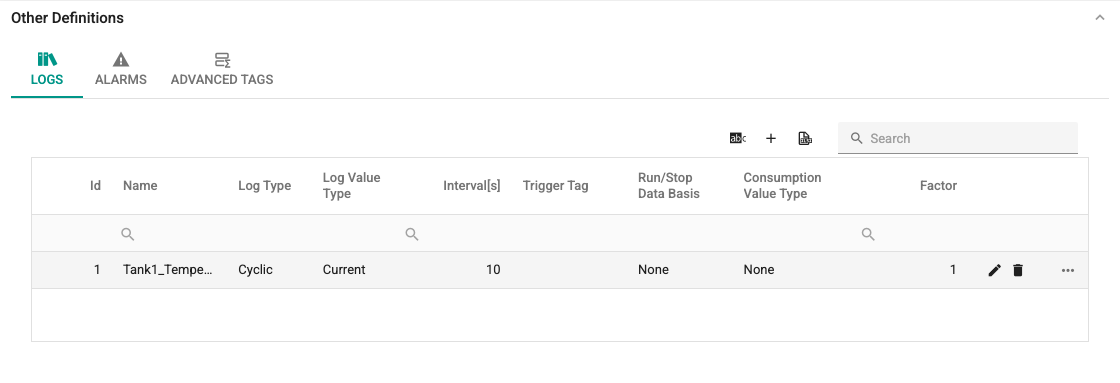
Depending on the screen width, the table hides some columns. Hidden columns are shown with the ... button at the end of the row. Besides the name of the log definition and the tag, the table has the Log Type, Log Value Type, Interval[s], Trigger Tag, Run/Stop Data Basis, consumption fields and Data Retention [Months] columns.
New Log Definition
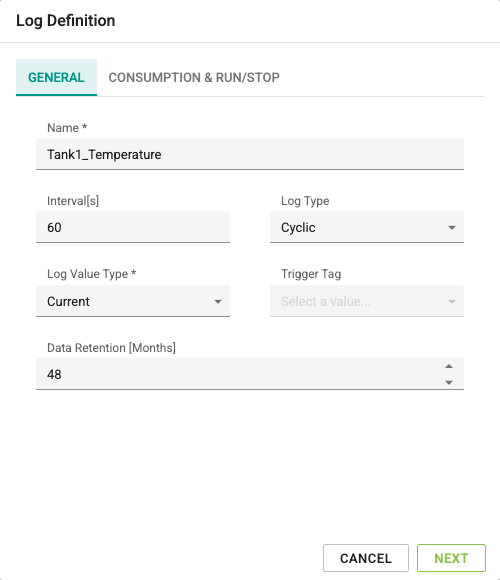
For a new log definition, click the + button of the table. The Log Definition window opens. The window has two steps: General and Consumption & Run/Stop. In the first step, the Next button goes to the second step; in the second step, Back returns to the first step and Save saves the definition. The Cancel button closes without saving. When moving forward, the fields of the first step are validated; if a field has an error, that step stays open.
General
Name: The name of the log definition. It must be 1–250 characters long, must not consist of digits only and must be unique.
Interval[s]: The recording interval (seconds) if the log type is Cyclic or Cyclic While Triggered. It must be between 0.1 and 2,073,600 seconds. It is disabled for other log types.
Log Type: Determines when an archive record is created:
- Cyclic (
Cycled): at intervals set by the Interval parameter, - On Change (
Changed): on every change of the tag value, - On Trigger Change (
TriggerChanged): when the value of the trigger tag changes, - Trigger Rising Edge (
TriggerRisingEdge): when the value of the trigger tag increases (for example, on a change from 0 to 1), - Trigger Falling Edge (
TriggerFallingEdge): when the value of the trigger tag decreases (for example, on a change from 1 to 0), - Cyclic While Triggered (
CycledWhenTriggered): at intervals set by the Interval parameter while the value of the trigger tag is greater than 0 (true for Bool).
Log Value Type: Determines which value is written to the archive:
- Current: The value of the tag at the moment of recording.
- Average: The average of the values taken at the moments the tag value changed between two records. Because protocols update a tag value only when it changes, the average is calculated from value changes, not from every read.
- Median (
Mean): The median of the values taken between two records. The values are sorted from smallest to largest; if the number of values is odd, the middle value is written; if it is even, the average of the two middle values is written. For example, the result for [1, 2, 100] is 2 and for [1, 2, 3, 100] it is 2.5. If there is a single value, that value is written. Median in advanced tags uses the same definition. - Sum: The sum of the values taken between two records. If no value was taken in between, 0 is written.
Minimum and Maximum
The supported log value types are Current, Average, Median and Sum. Log definitions saved with Minimum or Maximum in an earlier version are not deleted; a warning is shown when the definition is opened, and these logs write the value at record time, as with Current. Select a supported type before saving the definition.
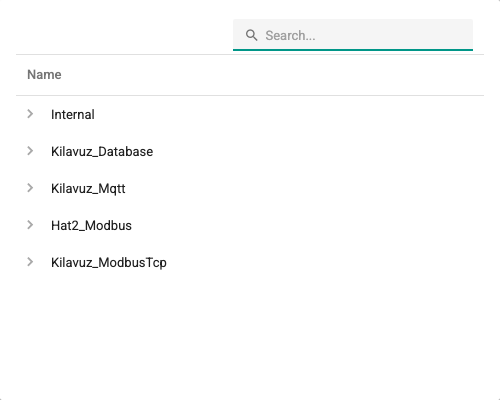
Trigger Tag: Required if the log type is On Trigger Change, Trigger Rising Edge, Trigger Falling Edge or Cyclic While Triggered. The value and the value changes of this tag are the precondition for creating an archive record.
Data Retention [Months]: How long the log data is kept in the archive. The default for new definitions is 48 months. The server accepts at most 60 months; a larger value is saved as 60 months.
If the retention period of an existing log definition is reduced, the I understand the risk of reducing the data retention period and I want to apply this change check box appears. Because a shorter period can cause older data to fall outside the retention window, the definition cannot be saved unless this box is selected.
Consumption & Run/Stop
The fields in this step determine how the log is used in consumption calculations and in the Run/Stop report. If the log is kept only for the archive, leave the default values.
Run/Stop Data Basis: Which kind of data the log is used as in the Run/Stop report:
| Option | Meaning | Condition |
|---|---|---|
| None | The log is not used in the Run/Stop calculation. | — |
| Changed state bit | A tag value greater than 0 counts as running and a value of 0 as stopped; every state change is recorded. | The log type must be On Change. |
| Sampled state bit | The same state bit is sampled at regular intervals. | The log type must be Cyclic and an Interval must be entered. |
| Cumulative run counter | The tag is a counter of the total running time. | The log type must be Cyclic and an Interval must be entered. |
| Cumulative stop counter | The tag is a counter of the total stop time. | The log type must be Cyclic and an Interval must be entered. |
For the counter options, the counter value is interpreted as hours after the Factor / Divisor conversion below.
Downtime reasons and Micro-stop threshold (s): shown when Run/Stop Data Basis is Changed state bit or Sampled state bit and the license includes downtime reasons. With Downtime reasons on, operators can enter reasons for the stops of this machine; stops without a reason that are shorter than the threshold are shown separately as micro-stops in the Pareto (0–3600 s, empty means 120 s). Details: Downtime Reasons.
The Consumption Calculation Parameters group:
- Consumption Value Type: How the tag value is interpreted in the consumption calculation:
- None: The log is not used in the consumption calculation.
- Instant: The tag is an instant value. The consumption of a period is the sum of the log records in the period.
- Cumulative: The tag is a continuously increasing counter (for example, an energy meter). The consumption of a period is the sum of the increases between consecutive records, starting from the last record before the period; when the counter is reset, that step counts as 0 (see Counter rule).
- Total Value Conversion[Factor/Divisor]: The calculated consumption is multiplied by Factor and divided by Divisor. Both must be at least 1; their default value is 1.
- Unit: The unit of the converted consumption (for example, kWh).
For logs with Instant or Cumulative selected as the Consumption Value Type and an Interval of at least 60 seconds, records are also taken at the start and end of the day so that nothing is missing at the day boundary. For using consumption values on pages, see the Consumption and Snapshots page.
Log Definitions Page
Select Settings > Log Definitions in the left menu to open the page where log definitions are listed and managed together. The page has two tabs at the top:
- By tag: Select a tag to manage the log definitions of that tag.
- All logs: All log definitions you are allowed to see are shown in a single list.
By Tag
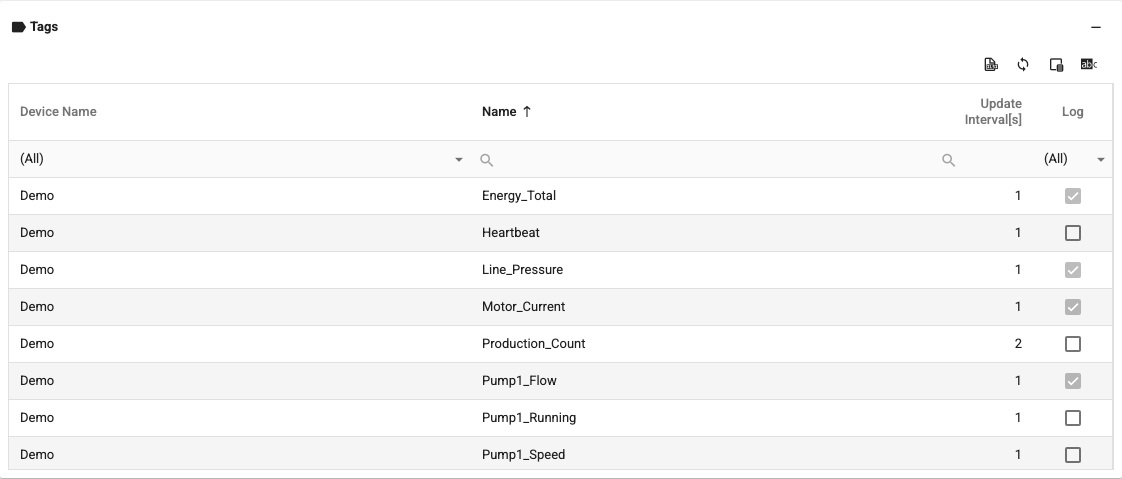
This tab has three parts: Filters at the top, the Tags table in the middle and the Log Definitions table of the selected tag at the bottom.
Filters: The tag list is filtered in two ways. By default, select Channels and Devices to list the tags of the selected devices.

Clicking the Process Groups button to the right of the filter header switches the filter to selecting Process Groups, Task Centers, Departments and Devices. The button is then named Channels; clicking it again returns to the channel filter. After making the selections, click the Update button.

Tags: The tags that match the filter are listed. When a tag is selected, its log definitions are shown in the table below. Tags with and without log definitions can be separated with the filter in the Log column.
Log Definitions: The log definitions of the selected tag are listed. This table works the same as the log definition table in tag management; definitions are made as described above.
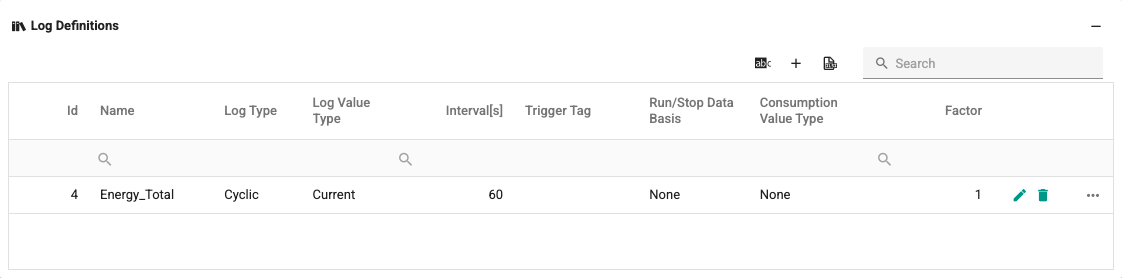
The − / + buttons to the right of the table headers collapse or expand the table.
All Logs
This tab shows all log definitions you are allowed to see in a paged list. The list is read-only. Columns: Name, Tag, Device, Channel, Log Type, Log Value Type, Interval[s], Trigger tag, Data Retention [Months] and Consumption Value Type.
- The Search box searches the name, tag, device, channel and trigger tag columns; the filters under the column headers can also be used.
- 25, 50 or 100 rows are shown per page.
- Clicking the Edit button of a row, or double-clicking the row, opens the window for editing the log definitions of that tag (Edit log definitions). When the window is closed, the list is refreshed.
This list has no Excel export, grouping or summary row.