
Advanced Tag Definition
An advanced tag is a tag whose value is not read from a device but calculated with an expression from the values of other tags. When a tag with the Advanced Tag check box selected is selected in the Tag Management table, the Advanced Tags tab appears in the Other Definitions section under the table.
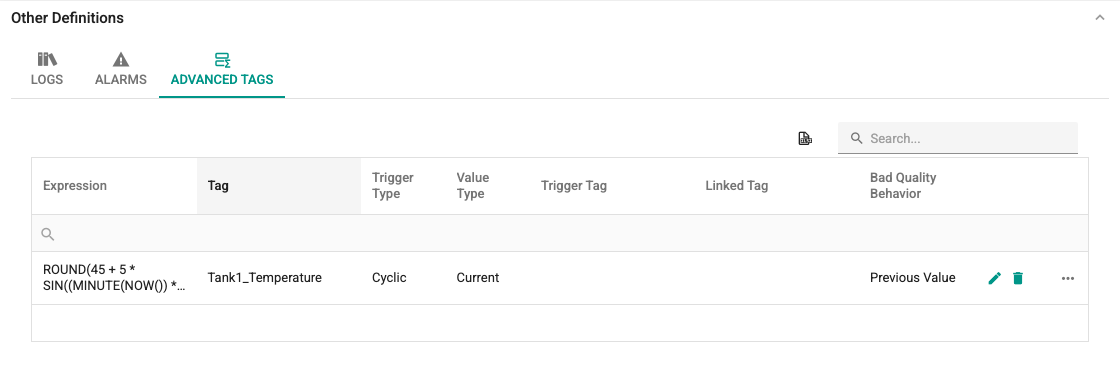
One advanced tag definition can be made for each tag. When a tag without a definition is selected, the + button in the tab is enabled. Clicking the button opens the Advanced Tag Definition window. The window has two tabs.
General Tab
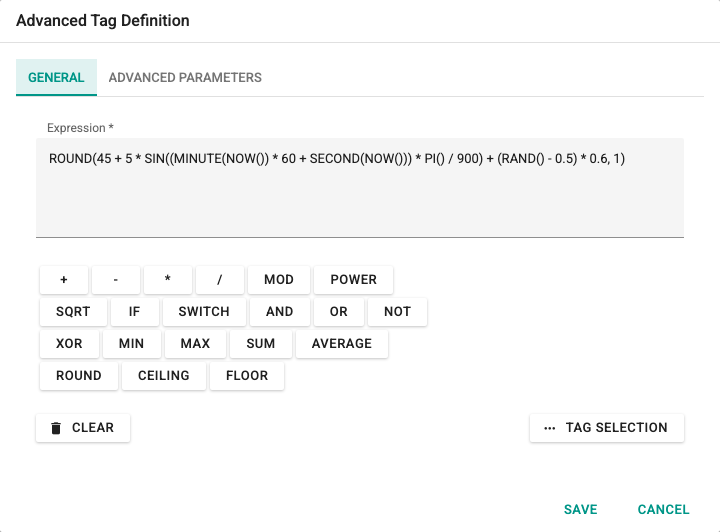
Expression: The calculation expression built from tag values. Tags are written in the expression as TAG(Channel.Device.Tag). The expression is validated on the server before it is saved; an invalid expression is not saved.
Under the box there are buttons for frequently used operators and functions (+, MOD, POWER, SQRT, IF, MIN, MAX, ROUND and so on). Clicking a button inserts the expression at the cursor position.
Under the buttons, on the left, is the Clear button, which clears the box completely; on the right is the Tag Selection button, which opens a tree for selecting tags in the system. A tag selected in the tree is added to the expression as TAG(...).
Advanced Parameters Tab
Trigger Type: Determines when the calculation is done. There are five options:
- Cyclic (
Cycled): at the update interval set for the tag, - On Change (
Changed): when the value of any tag used in the expression changes, - On Trigger Change (
TriggerChanged): when the value of the trigger tag changes, - Trigger Rising Edge (
TriggerRisingEdge): when the value of the trigger tag increases (for example, on a change from 0 to 1), - Trigger Falling Edge (
TriggerFallingEdge): when the value of the trigger tag decreases (for example, on a change from 1 to 0 or from true to false).
Value Type: Determines whether the instant value of the calculated expression is written to the tag, or a value derived from the values collected between calculations. The options are the same as the Log Value Type in log definitions: Current, Average, Median and Sum. With Median, if the number of values is odd, the middle value is used; if it is even, the average of the two middle values is used ([1, 2, 100] → 2).
For an advanced tag with Sum selected and Trigger Type set to Cyclic, no calculation is done if no values were collected during the period: the value of the advanced tag stays empty, nothing is written to the Linked Tag, and definitions that log this tag do not write a record for that period. Because values are collected only when the tags of the expression change, empty periods can occur on a stopped machine.
Minimum and Maximum
The supported value types are Current, Average, Median and Sum. Advanced tags saved with Minimum or Maximum in an earlier version are not deleted; a warning is shown when the definition is opened, and these tags give the instant value like Current.
Trigger Tag: If the trigger type is On Trigger Change, Trigger Rising Edge or Trigger Falling Edge, select the tag that triggers the calculation. It is required for these types and disabled for the others.
Linked Tag: Optional. If selected, the calculated value is also written to this tag. The value is written only while the quality of the linked tag is good.
Start Value: The first value given to the tag when the service starts. The field is validated against the data type of the tag: Bool tags show a check box, numeric tags must have a value within the range of the data type (for example, between −32,768 and 32,767 for Int, and between −2,147,483,648 and 2,147,483,647 for DInt), and String tags accept at most 65,536 characters.
Persistent: If selected, the last value of the tag is stored and the service continues with this value when it restarts. If there is no stored value, the Start Value is used.
The Bad Quality Tag Handling group determines what happens when one of the tags used in the expression has no value or has bad quality:
- Bad Quality Behavior:
- Not Calculate: No calculation is done.
- Previous Value: The previous value of the bad-quality tag is used. If there is no previous value, the Custom Bad Tag Value is used.
- Custom Value: The Custom Bad Tag Value is used instead of the bad-quality tag.
- Custom Bad Tag Value: Required for the Previous Value and Custom Value options. It cannot be used for String tags.
Click the Save button to save the definition; click Cancel to close without saving. Fields that do not follow the rules show an exclamation mark in a red circle next to them and an error message under the field.