
REST Server
The REST Server protocol lets IoT devices, cloud services and other software send tag values themselves (push) to 2WinScada with an HTTP POST request. Unlike the REST Client protocol, 2WinScada does not poll the external system; the external system delivers the data to the 2WinScada ingest endpoint at whatever interval it chooses.
Each REST Server device represents a separate data source. With every request, the external system sends the device identifier and the device key generated for that device in HTTP headers; if the identity is verified, the values in the body are written to the device's tags.
License
REST Server is available in the Standard and Professional license editions; it is not available in the Starter edition. If the license does not include REST integration, the ingest endpoint rejects requests with error code 4900. For details, see the License page.
Channel Definition
On the General tab of the new channel window, enter the Name and select RestServer as the Connection Type.
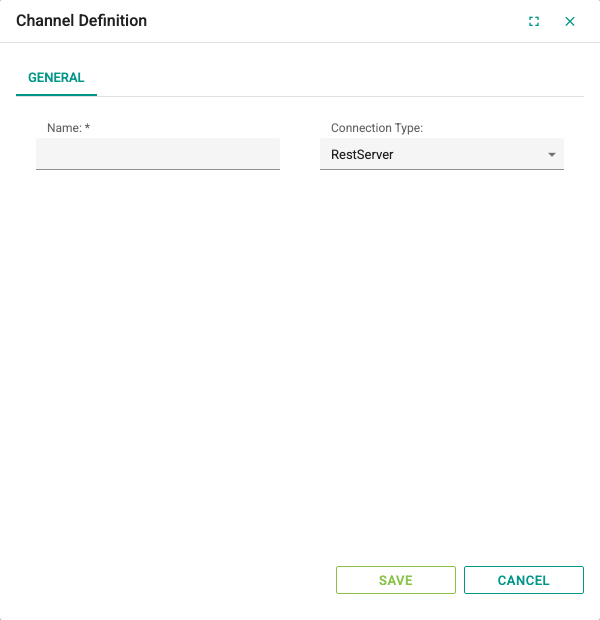
A REST Server channel has only the General tab; the channel has no connection parameters. The channel does not connect to the external system; it accepts the requests that arrive at the data ingest endpoint. Authentication and body settings are made on the Parameters tab of each device.
Device Definition
On the General tab, the Name and Active fields are filled in as for other protocols. The device must be Active for data to be accepted.
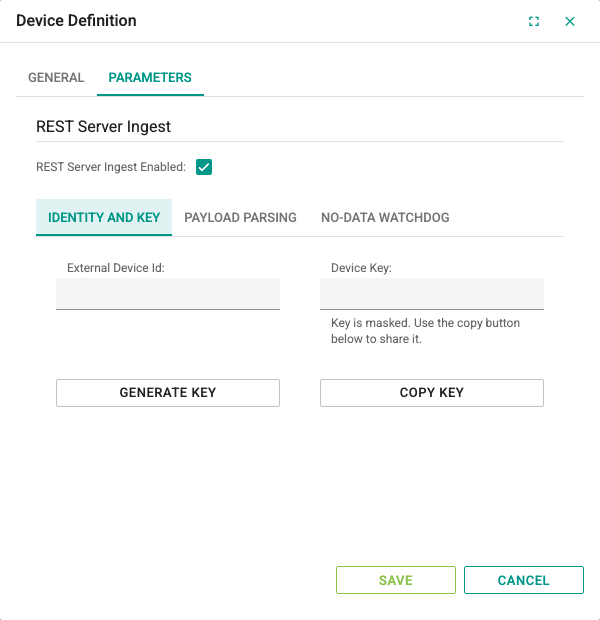
The Parameters tab contains the REST Server Ingest group:
- REST Server Ingest Enabled: Turns on data ingest for the device (default: selected). If not selected, requests to this device are rejected with error code
4603.
Below the group are the Identity and Key, Payload Parsing and No-Data Watchdog tabs.
Identity and Key
| Field | Description |
|---|---|
| External Device Id | Identifier that the external system sends in the X-Device-Id header to identify this device (e.g. kazan-dairesi-01). Matched case-insensitively. It is recommended to enter a hard-to-guess External Device Id for each device. If left empty, the device's numeric ID in the system must be written in the X-Device-Id header. |
| Device Key | Secret key that the external system sends in the X-Device-Key header. The field is shown masked; as stated in the help text below it, use the copy button to share the key. If the key is empty, no request to this device is accepted. |
| Generate Key | Gets a new random key from the server and writes it to the Device Key field. On a saved device, if the External Device Id is empty, the device's numeric ID is also written to that field. |
| Copy Key | Copies the key to the clipboard without displaying it. |
Creating and renewing a key:
- Click Generate Key. The generated key starts with
dev_. - Copy the key with Copy Key and transfer it securely to the configuration of the external system.
- Save the device form with Save. The new key becomes valid after saving; from that moment on, requests with the previous key are rejected with error code
4600.
WARNING
Do not share the device key over open channels such as e-mail, screenshots or query parameters; the key allows the system sending the request to write data to that device. Access the ingest endpoint over HTTPS so that the key is not carried as plain text on the network. When a device is copied, the External Device Id and Device Key are copied too; generate a new key on the copy and change the identifier.
Payload Parsing
This tab defines how free-form JSON in the body is converted to tag values. Examples of the body formats are in the Sending Data section.
| Field | Description | Default |
|---|---|---|
| List JSON Path | Dot-separated path of the field in the body that contains the tag list or tag object (e.g. data.items). The first part of the path must be a field at the root level of the body; the root itself cannot be referenced. Required while data ingest is enabled. | Empty |
| Tag Address Key | Name of the field in the list element that carries the tag address. Required while Tag address in object keys is not selected. | sourceKey |
| Tag Value Key | Name of the field in the list element that carries the value. Required. | value |
| Tag Timestamp Key | Name of the field in the list element that carries the timestamp. Optional. | ts |
| Decimal Separator | Decimal separator in values that arrive as text for numeric tags: Dot (.) or Comma (,). | Dot (.) |
| Tag address in object keys | If selected, the field names of the object referenced by List JSON Path are treated as tag addresses and the field values as tag values. | Not selected |
Field names are matched case-insensitively.
TIP
Even if you will use only the Metrics or Tags body format, List JSON Path must still be filled in; you can enter a name that does not exist in your body (e.g. items).
No-Data Watchdog
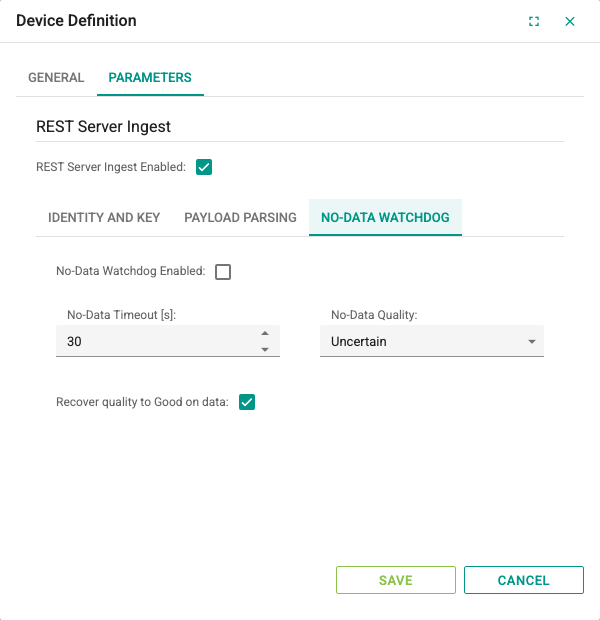
Lowers the quality of the device and its tags when no data arrives from the external system for a certain time.
| Field | Description | Default | Range |
|---|---|---|---|
| No-Data Watchdog Enabled | Turns on the watchdog. While it is off, the device quality stays Good even if no data arrives. | Not selected | – |
| No-Data Timeout [s] | The quality is lowered this many seconds after the last accepted data. If no data has arrived since the service started, the quality is lowered immediately. | 30 | 1–86400 |
| No-Data Quality | Quality assigned to the device and its tags when the time is exceeded: Bad or Uncertain. | Uncertain | – |
| Recover quality to Good on data | If selected, the quality of the device and all its tags is set to Good after every accepted request. If not selected, only the tags that received a value become Good; the device quality stays low. | Selected | – |
Tag Definition
Select the device in the channel tree and add a new tag in the tag table on the right. The common fields are filled in as on the Tag Management page.
Each incoming value is matched only among the tags of the authenticated device, in this order:
- If
TargetTagIdis given in the body, the tag with this numeric ID. - The tag whose Address field is the same as the incoming address (e.g. the
sourceKeyvalue or theMetricsfield name). - If none is found, the tag whose name is the same as the incoming address.
Address and name comparisons are case-insensitive; leading and trailing spaces are ignored. Values that do not match are rejected and written to the Errors list in the response.
Choose a Data Type that suits the incoming value; a value that cannot be converted is rejected. The Update Interval[s] field is not used for REST Server; the tag is updated as soon as the request arrives.
Sending Data
Request
| Property | Value |
|---|---|
| Address | https://<server>/api/RestIngest/Telemetry |
| Method | POST |
Content-Type header | application/json |
X-Device-Id header | External Device Id or the device's numeric ID |
X-Device-Key header | Device Key |
<server> is the address of the 2WinScada web interface; the endpoint is published on the same HTTPS address as the web interface. If the web interface is published on a port other than the default, add the port as well (https://<server>:<port>). The endpoint does not require a user session or an API key; authentication is done only with the device key.
Example request:
POST /api/RestIngest/Telemetry HTTP/1.1
Host: <server>
Content-Type: application/json
X-Device-Id: kazan-dairesi-01
X-Device-Key: <device-key>

{
  "MessageId": "kazan-0001",
  "DeviceTime": "2026-10-15T08:30:00Z",
  "Metrics": {
    "Kazan1_Run": 1,
    "Kazan1_Temp": 45.2
  }
}
The same request with curl:
curl -X POST "https://<server>/api/RestIngest/Telemetry" \
  -H "Content-Type: application/json" \
  -H "X-Device-Id: kazan-dairesi-01" \
  -H "X-Device-Key: <device-key>" \
  -d '{"Metrics":{"Kazan1_Run":1,"Kazan1_Temp":45.2}}'
Body formats
The body must be a JSON object (an array at the root level is not accepted). These fixed fields can be used in the body; the field names are case-insensitive:
| Field | Description |
|---|---|
MessageId | Optional message identifier (at most 200 characters). A second request for the same device with the same identifier within 24 hours is not processed; IsDuplicate returns true in the response. This record is kept in memory and reset when the service restarts. |
DeviceTime | Optional timestamp in ISO 8601 format (e.g. 2026-10-15T08:30:00Z). Used for values that have no time of their own. |
Metrics | Object whose field names are tag addresses and whose values are tag values. |
Tags | Array of elements made up of SourceKey or TargetTagId, Value and the optional Ts fields. |
Every field other than these is processed according to the Payload Parsing settings. A request must contain at least one value source; several formats can be used together in the same request.
Metrics format: All values are recorded with DeviceTime (or the server time if it is missing).
{
  "DeviceTime": "2026-10-15T08:30:00Z",
  "Metrics": { "Kazan1_Run": 1, "Kazan1_Temp": 45.2 }
}
Tags format: Each element can carry its own timestamp. If TargetTagId is given, the tag is matched by its numeric ID.
{
  "Tags": [
    { "SourceKey": "Kazan1_Run", "Value": 1, "Ts": "2026-10-15T08:30:00Z" },
    { "TargetTagId": 1234, "Value": 45.2 }
  ]
}
List format: When List JSON Path is data.items and the other settings are at their defaults:
{
  "data": {
    "items": [
      { "sourceKey": "Kazan1_Run", "value": 1, "ts": "2026-10-15T08:30:00Z" },
      { "sourceKey": "Kazan1_Temp", "value": 45.2 }
    ]
  }
}
If the path points to a single object instead of an array, this object is read as a single value.
Addresses in field names: When List JSON Path is data and Tag address in object keys is selected. The value of a field can be the tag value directly, or an object that contains the Tag Value Key and Tag Timestamp Key fields:
{
  "data": {
    "Kazan1_Run": 1,
    "Kazan1_Temp": { "value": 45.2, "ts": "2026-10-15T08:30:00Z" }
  }
}
Values and timestamp
- A value can be a JSON number, text or
true/false.null, object or array values are rejected. - For values that arrive as text for numeric tags, the decimal separator is interpreted according to the Decimal Separator setting; no thousands separator may be used. Values sent as JSON numbers are not affected by this setting.
- Timestamps must be sent as text in ISO 8601 format. Unix timestamps (numbers) are not supported: they are ignored in the list and field-name formats, and in the
DeviceTimeorTsfield they cause the whole request to be rejected. - The time of a value is taken, in order, from the element's own timestamp, from the
DeviceTimefield or from the server time. - The JSON representation of a single value cannot exceed 262,144 characters; a longer value is rejected.
Response
When the request reaches the endpoint and is processed, the response returns with HTTP code 200, including authentication errors; the result is evaluated from the Success and ErrorCode fields in the body. If the body is not valid JSON or one of the fixed fields is not of the expected type, HTTP 400 is returned; if the Content-Type is not JSON, HTTP 415 is returned.
Example successful response:
{
  "Success": true,
  "ErrorMessage": null,
  "ErrorCode": 0,
  "Payload": {
    "DeviceIdentifier": "kazan-dairesi-01",
    "DeviceId": 12,
    "MessageId": "kazan-0001",
    "IsDuplicate": false,
    "AcceptedCount": 2,
    "RejectedCount": 0,
    "Errors": []
  }
}
Even if Success is true, some values may have been rejected. AcceptedCount is the number of accepted values and RejectedCount the number of rejected values; the Errors list contains the reasons for rejection (e.g. Tag mapping not found, Type conversion failed, Payload item too large).
Error codes:
ErrorCode | Meaning |
|---|---|
1101 | The X-Device-Id or X-Device-Key header is missing. |
4600, 4602 | The device identifier or the device key is not valid, or the device is not loaded at runtime. |
4601 | The body is invalid: there is no value source, an address/identifier or value is missing in a Tags element, MessageId exceeds 200 characters, or no value could be extracted from the body. |
4603 | The device is inactive, REST Server Ingest Enabled is not selected, or the device is currently not accepting data. |
4900 | The license does not include REST integration. |
1000 | Unexpected error; the details are in the service log. |
Troubleshooting
| Symptom | Checks |
|---|---|
1101 is returned | Check that the X-Device-Id and X-Device-Key header names are spelled correctly and are not empty. |
4600 or 4602 is returned | Check that the X-Device-Id value is the same as the External Device Id and that the device is in a channel of the RestServer type. Make sure the same External Device Id is not used on more than one device. Check that the key in the external system is the same as the latest key saved on the device; if the key was renewed, make sure the device was saved and the external system was updated. If the device was added recently, make sure it has been loaded into the runtime. |
4603 is returned | Check the Active and REST Server Ingest Enabled settings of the device; after a change, make sure the device has been loaded into the runtime. |
4601 is returned | Check that the body is a JSON object, that the List JSON Path points to the actual path in the body, and that the Tag Address Key / Tag Value Key names are the same as the field names in the body. |
Tag mapping not found error | Check that the incoming address is the same as the tag's Address field or the tag name, and that the tag belongs to the same device. |
Type conversion failed error | Check the type of the value, the tag's Data Type selection and, for numbers that arrive as text, the Decimal Separator setting. |
HTTP 400 is returned | Check that the body is valid JSON, that the DeviceTime and Ts fields are ISO 8601 text and that the Tags field is an array. |
| Tag quality drops to Uncertain or Bad | If the No-Data Watchdog is on, check that the data send interval is shorter than the No-Data Timeout [s] value. |