
Operation History
When a user writes a value to a tag through the interface (for example with the Write to Tag window on the Dashboard or with the control widgets on pages), a record is created for the operation. The records are queried on the Operation History page, which opens when you select History > Operations in the menu.
Values of Bool tags are recorded as 0 and 1. A record shows that the write request was passed to the driver; it does not show that the PLC applied the value. When the server rejects a write, the user sees a warning (see Write result).
Filters
Set the Start date and End date as on the Reporting screen. If you only want the records of certain tags, select the tags in the channel and device tree of the Tags field. Then click Update to run the query.
Table
The write operations on tags are listed in the table below.
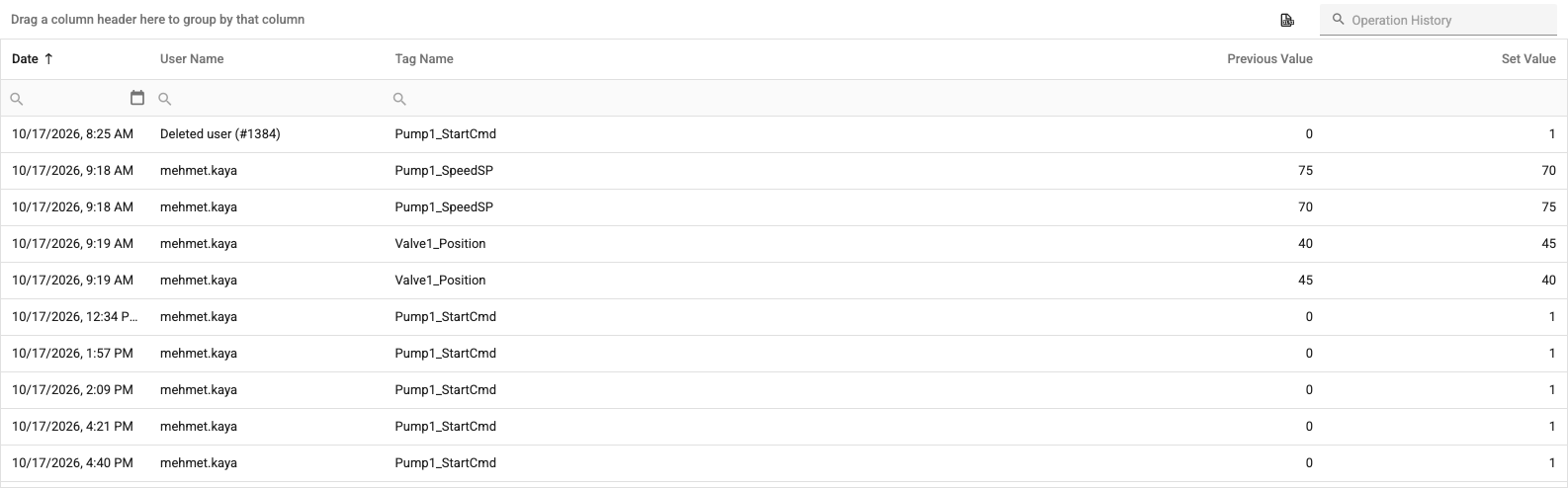
The table columns are:
- Date: The date and time of the change.
- User Name: The user who made the change.
- Tag Name: The tag the value was written to.
- Previous Value: The value of the tag before the write.
- Set Value: The value written to the tag.
You can group the records by user or tag by dragging column headers to the grouping area above the table. Filter the records with the filter row and the search box; the table can be exported as an Excel file. The Full Screen button in the header expands the page to the whole screen.