
Siemens S7 TCP
The Siemens S7 TCP protocol lets 2WinScada communicate over Ethernet with Siemens S7 family PLCs (S7-200, S7-200 Smart, LOGO! 0BA8, S7-300, S7-400, S7-1200, S7-1500). Communication uses ISO-on-TCP; the default port is TCP 102. 2WinScada reads the PLC's DB, input (I), output (Q), memory (M), timer (T) and counter (C) areas by absolute address and writes to writable tags.
The address syntax and data types are described on the Siemens S7 Addressing page.
Safety
Before trying write operations on production equipment, verify the PLC program, process safety and user permissions. During initial commissioning, define tags as Read Only; enable writing only after controlled verification.
License
Siemens S7 TCP is one of the standard protocols and is available in all license packages. For license details, see the License page.
Channel Definition
On the General tab of the new channel window, enter the channel name and select SiemensTcp as the Connection Type. This protocol has no connection parameters at channel level; the connection settings are entered separately for each device. Click Save to create the channel.
Device Definition
Right-click the Siemens channel in the channel tree and select New Device to open the device window. On the General tab, the device name and Active are set as for other protocols.
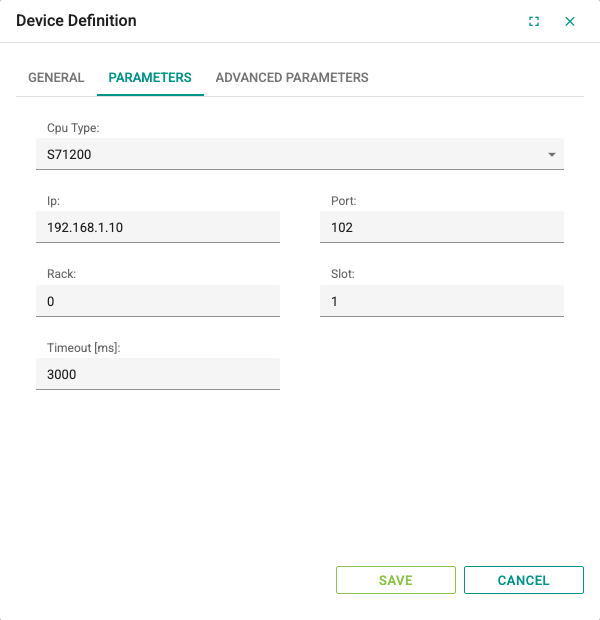
Parameters tab:
| Field | Description | Default | Range |
|---|---|---|---|
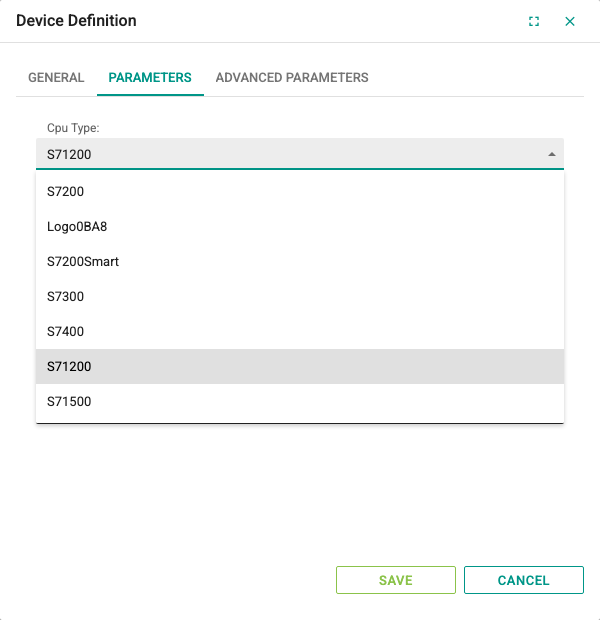
| Cpu Type | PLC family: S7200, Logo0BA8, S7200Smart, S7300, S7400, S71200 or S71500 | S71200 | Selected from the list |
| Ip | IPv4 address of the PLC or the Ethernet module; DNS names are not accepted | 255.255.255.255 | A valid IPv4 address |
| Port | ISO-on-TCP port | 102 | 1–65535 |
| Rack | Rack number of the CPU | 0 | 0 or greater |
| Slot | Slot number of the CPU | 1 | 0 or greater |
| Timeout [ms] | Time to wait for read and write responses | 3000 | 3000–86400000 |
The default Ip value is only a placeholder; enter the real address of the PLC (e.g. 192.168.1.10) before saving the device.
Enter Rack and Slot according to the hardware configuration in the PLC project. Typical values:
| PLC | Rack | Slot |
|---|---|---|
| S7-300 | 0 | 2 |
| S7-400 | 0 | CPU slot in the hardware configuration |
| S7-1200 / S7-1500 | 0 | 1 (0 in some configurations) |
Advanced Parameters tab:
| Field | Description | Default | Range |
|---|---|---|---|
| Idle Time To Reinit Device [s] | If no successful read is made from the PLC for this long while the connection is open, the connection is closed and re-established. If 0 is entered, this check is off. | 0 | 0–86400 |
Tag Definition
Tags are defined in the device's tag table in the same way as for other protocols (see Tag Management). On Siemens devices, fill in the fields according to these rules:
| Field | Siemens rule |
|---|---|
| Address | Absolute S7 address, e.g. DB1.DBD4, MW20, I0.0. For the syntax, see Siemens S7 Addressing. |
| Data Type | Must match the type of the variable in the PLC. The Data Type determines the number of bytes read and how the value is decoded. A Bool tag requires a bit address; LInt, ULInt and LWord are not supported. |
| Length | For String tags, the maximum number of characters defined in the PLC (e.g. 20 for STRING[20]). Must be 1 for other types. |
| Update Interval[s] | Read period of the tag; 0.5–86400 seconds |
| Read Only | If selected, 2WinScada does not write to this tag. |
Example definitions:
| Address | Data Type | Meaning |
|---|---|---|
DB1.DBX0.0 | Bool | DB1, byte 0, bit 0 |
DB1.DBW2 | Int | INT starting at byte 2 in DB1 |
DB1.DBD4 | Real | REAL starting at byte 4 in DB1 |
M10.3 | Bool | Memory byte 10, bit 3 |
MD40 | DInt | DINT starting at memory byte 40 |
IW64 | Int | Input word starting at byte 64 |
Read and write behavior
- Tags are grouped by their Update Interval[s] value. Nearby addresses with the same interval in the same memory area (the same DB, I, Q or M) are combined into a single read request: the gap between them can be at most 30 bytes, and one request can be at most 200 bytes. To reduce the number of reads, place variables that are read together at adjacent addresses in the PLC.
- Writing to a Bool tag changes only the addressed bit; the other bits in the same byte are not affected.
- Text written to a String tag is written in S7 STRING format according to the Length value.
- If the connection cannot be established or is lost, the quality of the device and its tags becomes Bad. 2WinScada tries to reconnect at most once every 30 seconds.
- If a read request fails while the connection is open, only the quality of the tags in that request becomes Bad.
Troubleshooting
| Symptom | Checks |
|---|---|
| The connection cannot be established | Check the Ip and Port values, network access and TCP port 102 on the firewall. Verify that the Cpu Type, Rack and Slot values match the PLC hardware configuration. |
| Cannot connect to an S7-1200 / S7-1500, or reads are rejected | In TIA Portal, check that PUT/GET access from a remote partner is allowed in the CPU properties and that the CPU protection level allows access. |
| A DB cannot be read | Check that the DB exists in the PLC and that the address is within the DB size. On S7-1200 / S7-1500, the "Optimized block access" option in the DB properties must be off; otherwise the DB cannot be accessed by absolute address. |
| The value is meaningless or wrong | Check that the Data Type matches the type in the PLC and that the address points to the start byte of the variable (see Siemens S7 Addressing). |
| A Bool tag gets no value or is not saved | The address of a Bool tag must contain a bit number (e.g. DB1.DBX0.0, M10.3); a bit address is used only on Bool tags. |
| Tag is Bad after an upgrade | The tag does not follow the 2.10 rules (LInt/ULInt/LWord, or the address does not match the data type). Fix the tag according to the reason in the service log and save (see Siemens S7 Addressing). |
| The address is not accepted | Check that the address is written in upper case with a supported syntax and that a bit address is used only on a Bool tag. The error message shows the reason for the rejection. |
| The connection drops and is re-established at short intervals | Check that the Idle Time To Reinit Device [s] value is longer than the tags' Update Interval[s] value, or set it to 0. |
| Write fails | Check the Read Only setting, the user's permission and that the address is writable in the PLC. Values written to inputs (I) are refreshed by the PLC in every cycle. |