
Trend
The Energy Performance > Trend screen shows the monthly consumption or energy intensity of a scope over a range of at most 12 months. The chart also draws the baseline and target lines.
Analysis — not evidence
This information bar stays at the top of the screen: Analysis — not evidence. Use the closed monthly reports as the official record. The trend shows closed months from their official revisions and open months from their drafts. Trend and live analysis are not exported; the XLSX comes only from a closed monthly report.
The trend needs the add-on, current data rights and valid tag links; in archive mode it is not in the menu (see Archive mode).
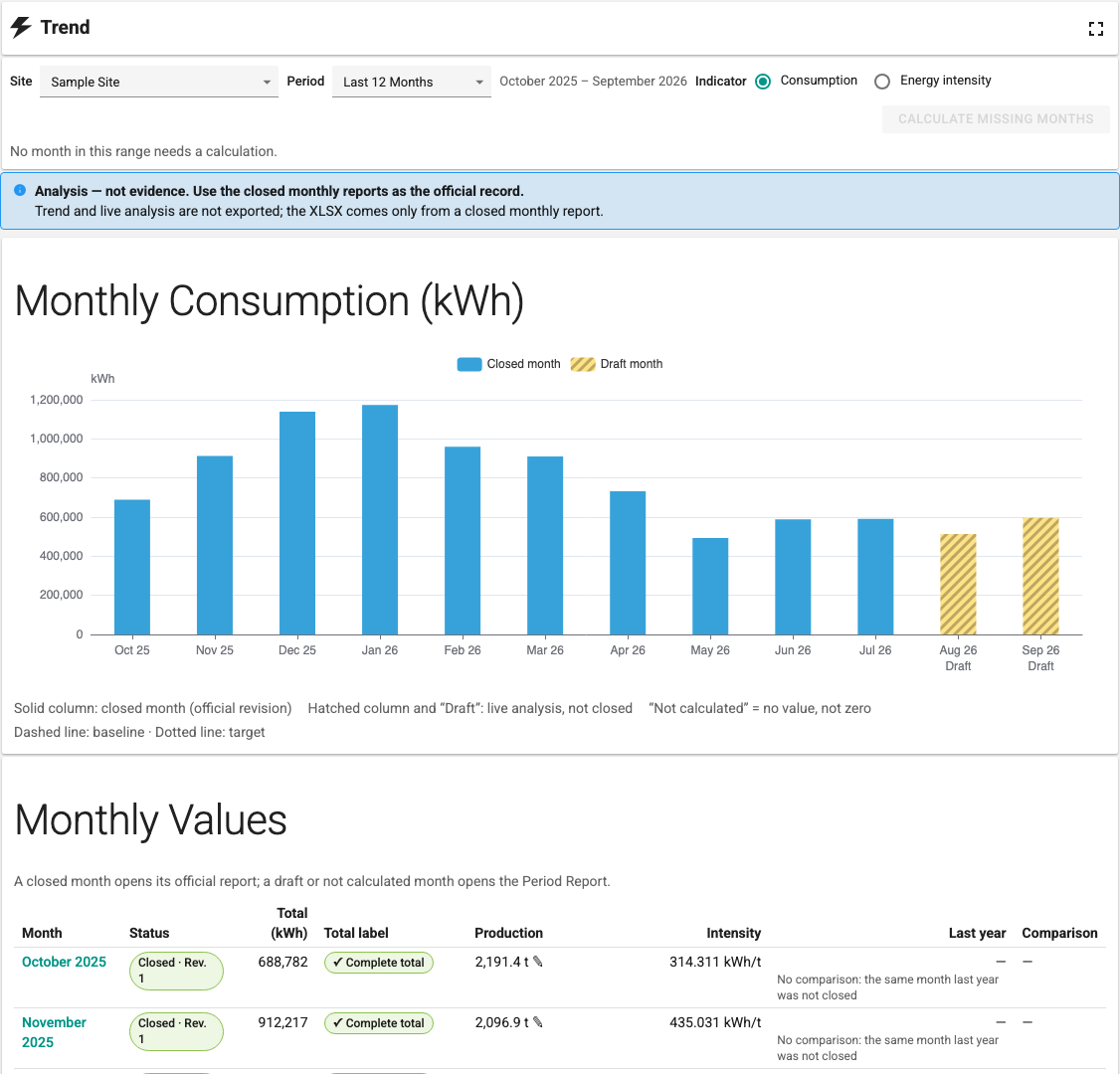
Selections
| Selection | Description |
|---|---|
| Site | The scope (site or area/line). |
| Period | Last 12 Months, This Year, Last Year or Custom (Start month, End month). At most 12 months. |
| Indicator | Consumption (kWh) or Energy intensity. For energy intensity, a Production is selected. If no production is defined, the option is disabled: Energy intensity is not available: no production quantity is defined. |
Chart
| Display | Meaning |
|---|---|
| Solid column | Closed month (official revision) |
| Hatched column and Draft | Live analysis, not closed |
| Filled point | Comparable month (joined by the line) |
| Hollow point | Month not comparable (not joined; reason in the tooltip) |
| Not calculated | No value, not zero |
| Dashed line / dotted line | Baseline / target |
Below a month on the axis, Not readable, No access, No value or No total can also appear. Color alone carries no meaning; every state is also written as text.
In months that are not comparable (for example the energy total is partial or production is missing), no difference to the baseline and target is calculated. The product does not say "improvement" or "savings"; it only shows the difference.
If there is no closed month in the selected range, the bar says There is no closed month in this range: the chart shows drafts only.
Monthly values table
The Monthly Values table below the chart is the accessible counterpart of the chart: Month, Status, Total (kWh), Total label, Production, Intensity, Last year, Comparison. Manually entered production appears with the note entered manually.
A closed month opens its official report; a draft or not calculated month opens the Period Report. The month rows are links and can be opened in a new tab.
Calculate missing months
Calculate Missing Months calculates, in a single job, the open months in the selected range that are not calculated or whose draft is out of date: {count} months are not calculated or out of date. {from} – {to} is calculated in one job; closed months stay unchanged. The calculation runs in the background as on the Period Report (see Calculation). When it finishes, the notification Trend months calculated. appears.
If there is no month to calculate, the screen says No month in this range needs a calculation. The trend does not recalculate closed months; a new revision for a closed month is requested from the Period Report.
Access
The trend checks access for each month separately. If you are not allowed to open the official report of a month, the value of that month is not shown: You are not allowed to open the official report of this month; its total and details are not shown. If a draft was calculated from tags you have no rights on: The draft of this month was calculated from tags you have no rights on; its values are not shown. These months are not counted as zero and are not included in averages.